> ## Documentation Index
> Fetch the complete documentation index at: https://docs.paygood.com/llms.txt
> Use this file to discover all available pages before exploring further.
# Tokenize and Register Payment Instruments with PayGood
> Learn how to register tokenized cards and bank accounts as payment instruments in PayGood and understand instrument statuses before charging.
A payment instrument is a tokenized card or bank account linked to a customer. You must register at least one instrument before you can create a payment for that customer. PayGood never stores raw card or bank account numbers — instead, it works exclusively with vault tokens that represent sensitive data held securely by your token vault provider.
## How tokenization works
Raw card and bank account data never touches PayGood's servers. Before registering an instrument, you tokenize the sensitive data using a supported vault provider, which will return an opaque token ID that represents the underlying data.
You then pass that token ID to PayGood via `POST /payment-instruments`. PayGood forwards it to the payment processor on your behalf during a charge. This architecture means your integration never handles raw PANs or routing numbers, keeping you out of PCI scope.
## Collecting a payment instrument
We provide two NPM packages you can integrate into your website to collect a card or bank account: `collect-core` (pure TypeScript component), or `collect-react` (React component).
collect-core: [link](https://www.npmjs.com/package/@paygood1/collect-core) , collect-react: [link](https://www.npmjs.com/package/@paygood1/collect-react)
Due to a temporary issue, initialize the component with `useStockDomain: false` . Once a fix is released, this will no longer be necessary and docs will be updated.
Here's what the component looks like:
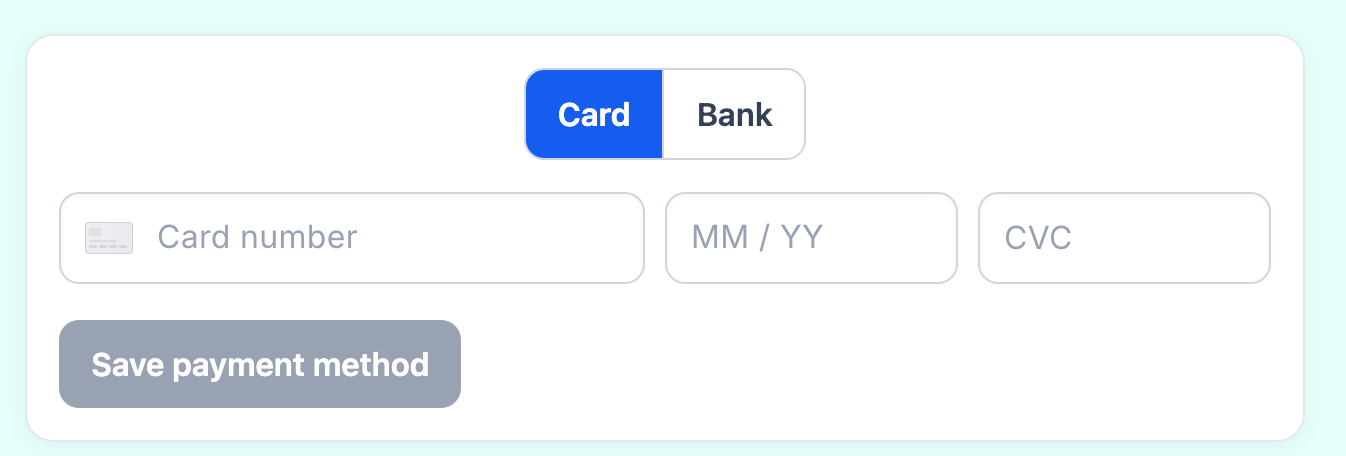 See package docs for shape of result.
## Register a card instrument
Once you have a vault token for a card, send a `POST /payment-instruments` request with `type: "card"` and the token details.
```bash theme={null}
curl -X POST https://api.paygood.co/payment-instruments \
-H 'Authorization: Bearer $PAYGOOD_API_KEY' \
-H 'Content-Type: application/json' \
-d '{
"customerId": "cus_01hxy4m2nqk9g3x3y3p0azq1cf",
"type": "card",
"vaultToken": {
"id": "tok_01hxy9n3prk9h4y4z4q1bar3ch",
"provider": "basistheory"
}
}'
```
PayGood returns a payment instrument record with masked display details and an initial status.
```json theme={null}
{
"paymentInstrumentId": "pi_01hxy5p3mqk9h4y4z4q1bar2dg",
"type": "card",
"displayDetails": {
"kind": "card",
"brand": "visa",
"last4": "4242",
"expiryMonth": 12,
"expiryYear": 2027
},
"status": "active",
"createdAt": "2024-06-01T12:01:00Z"
}
```
## Register a bank account instrument
To register a bank account, use the same endpoint with `type: "bank_account"` and a vault token that represents the tokenized account details.
```bash theme={null}
curl -X POST https://api.paygood.co/payment-instruments \
-H 'Authorization: Bearer $PAYGOOD_API_KEY' \
-H 'Content-Type: application/json' \
-d '{
"customerId": "cus_01hxy4m2nqk9g3x3y3p0azq1cf",
"type": "bank_account",
"vaultToken": {
"id": "tok_01hxyc0u3vl9m9d9e9v6gft7il",
}
}'
```
The response includes bank account display details instead of card fields.
```json theme={null}
{
"paymentInstrumentId": "pi_01hxyd1v4wm9n0e0f0w7hgu8jm",
"type": "bank_account",
"displayDetails": {
"kind": "bank_account",
"last4": "6789",
"scheme": "ach",
"bankName": "Chase"
},
"status": "active",
"createdAt": "2024-06-01T12:06:00Z"
}
```
## Instrument statuses
An instrument moves through the following statuses after registration.
| Status | Description |
| ---------- | --------------------------------------------------------------------------- |
| `pending` | The instrument has been registered and is being verified by the processor. |
| `active` | Verification is complete and the instrument can be used to create payments. |
| `failed` | Verification failed. The instrument cannot be used. Register a new one. |
| `disabled` | The instrument has been deactivated and can no longer process payments. |
Once an instrument reaches `active` status, store its `paymentInstrumentId` in your database. You'll reference it on every payment you create for that customer.
See package docs for shape of result.
## Register a card instrument
Once you have a vault token for a card, send a `POST /payment-instruments` request with `type: "card"` and the token details.
```bash theme={null}
curl -X POST https://api.paygood.co/payment-instruments \
-H 'Authorization: Bearer $PAYGOOD_API_KEY' \
-H 'Content-Type: application/json' \
-d '{
"customerId": "cus_01hxy4m2nqk9g3x3y3p0azq1cf",
"type": "card",
"vaultToken": {
"id": "tok_01hxy9n3prk9h4y4z4q1bar3ch",
"provider": "basistheory"
}
}'
```
PayGood returns a payment instrument record with masked display details and an initial status.
```json theme={null}
{
"paymentInstrumentId": "pi_01hxy5p3mqk9h4y4z4q1bar2dg",
"type": "card",
"displayDetails": {
"kind": "card",
"brand": "visa",
"last4": "4242",
"expiryMonth": 12,
"expiryYear": 2027
},
"status": "active",
"createdAt": "2024-06-01T12:01:00Z"
}
```
## Register a bank account instrument
To register a bank account, use the same endpoint with `type: "bank_account"` and a vault token that represents the tokenized account details.
```bash theme={null}
curl -X POST https://api.paygood.co/payment-instruments \
-H 'Authorization: Bearer $PAYGOOD_API_KEY' \
-H 'Content-Type: application/json' \
-d '{
"customerId": "cus_01hxy4m2nqk9g3x3y3p0azq1cf",
"type": "bank_account",
"vaultToken": {
"id": "tok_01hxyc0u3vl9m9d9e9v6gft7il",
}
}'
```
The response includes bank account display details instead of card fields.
```json theme={null}
{
"paymentInstrumentId": "pi_01hxyd1v4wm9n0e0f0w7hgu8jm",
"type": "bank_account",
"displayDetails": {
"kind": "bank_account",
"last4": "6789",
"scheme": "ach",
"bankName": "Chase"
},
"status": "active",
"createdAt": "2024-06-01T12:06:00Z"
}
```
## Instrument statuses
An instrument moves through the following statuses after registration.
| Status | Description |
| ---------- | --------------------------------------------------------------------------- |
| `pending` | The instrument has been registered and is being verified by the processor. |
| `active` | Verification is complete and the instrument can be used to create payments. |
| `failed` | Verification failed. The instrument cannot be used. Register a new one. |
| `disabled` | The instrument has been deactivated and can no longer process payments. |
Once an instrument reaches `active` status, store its `paymentInstrumentId` in your database. You'll reference it on every payment you create for that customer.